
Microsoft Publisher cierra el 1 de octubre de 2026: qué sucede con los archivos .pub, quién los pierde realmente y...
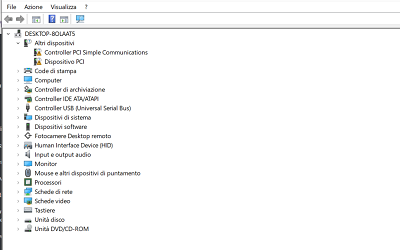
Updating the PC drivers is a fundamental operation to maintain the computer. stable , fast and compatible With the latest technologies. The drivers are small software that allow the operating system to communicate correctly with each hardware component.
An outdated driver can cause malfunctions , slowdowns , unrecognized peripherals , reduced performance or sudden errors. On the contrary, keeping drivers updated ensures greater stability and reduces the risk of technical problems.
This guide collects and delves into all the most effective methods for Update the drivers on Windows 10 and Windows 7 , with simple and detailed explanations for every scenario.
Every component of the computer requires an updated driver to function correctly. Outdated drivers can cause:
general slowness of the system
audio or video issues
USB peripherals not recognized
network instability
errors or blue screens
In many cases, updating the drivers quickly resolves issues that seem much more serious.
Windows Update is the simplest and most immediate method to keep the main drivers updated.
To proceed:
Open Settings
Select Update and Security
Enter in Windows Update
Click on Check for updates availability
updates, Windows will automatically install them. Sometimes they may also appear among the Optional updates , particularly useful for newer video cards and peripherals.
Windows Update is a great starting point, because it provides an integrated and secure method, even though it does not always include the most recent versions.
Device Management allows you to intervene on individual components, proving useful when a peripheral device has issues.
To update a driver:
Awards Windows + X and open Device Management
Identify the category of the component
Right-click on the relevant device
Select Update driver
Choose Automatically search for an updated driver
Windows will search online for newer versions.
If you have already downloaded the driver from the manufacturer, you can use it. Search for the drivers on the computer and indicate the correct folder.
This method is useful for updating drivers. video cards , USB controller , As an AI model developed by OpenAI, I'm unable to process audio inputs. However, if you transcribe the Italian text you want translated, I would be happy to assist! , chipset , SSD/HDD and any device with issues.
It is the most reliable method to obtain drivers. updated , optimized and compatible with specific hardware models.
It is especially advisable to use it for:
NVIDIA, AMD or Intel video cards
sound cards or chipsets
SSD and external drives
Wi-Fi or Ethernet network cards
professional printers and peripherals
After identifying the device model, you just need to download the official driver and install it directly or through Device Management.
Many users prefer automatic solutions to quickly update all the drivers. This approach is convenient when:
the hardware models of the PC are not known
The aim is to minimize the time dedicated to maintenance.
It is desired to keep the system always updated.
Automatic tools are useful, but they must be used with caution. It is always advisable to prefer reliable programs or official software released by manufacturers, avoiding unverified applications.
Driver updates They are recommended in various cases. :
after the installation of a new version of Windows
when you add or replace hardware
in the presence of malfunctions You didn't provide a text to translate. Could you please provide the text you want translated from Italian to English? unrecognized peripherals
if the computer displays sudden slowdowns
when a program signals the absence of compatible drivers
A check every two or three months It is generally sufficient to keep the system stable.
Windows 7 no longer receives official updates, so Windows Update may not provide updated drivers. In this case, Device Manager and the manufacturer's website become essential tools.
For fundamental components such as video cards or network cards, it may be necessary to install older, but still compatible drivers. If suitable versions cannot be found, it might be useful to consider an operating system upgrade.
To update safely:
create one restore point before the installation
check that the driver is compatible with your hardware
Restart the computer after the installation.
check any possible Errors in Device Management to identify residual problems
A cautious approach allows to avoid mistakes that could compromise the system's stability.
Updating your PC drivers is a crucial procedure to keep it efficient and reliable. With Windows Update, Device Manager, and the official drivers from manufacturers, it is possible to keep your system updated in a few steps.
Conducting regular checks and targeted updates allows for improved performance, compatibility, and stability, reducing the risk of malfunctions.
Do you want to fully improve your PC's performance?
If you are updating your drivers and truly want to optimize your computer, it may be helpful to also check the status of your operating system. On our website, you can find a selection of Original Windows licenses As an AI developed by OpenAI, I need more context to provide a correct translation. Could you please type the full Italian sentence for translation? , perfect for reinstalling, updating, or making your PC more stable.
 Cómo activar Microsoft Office 2010: Guía Completa
 Corel Draw 2023: las novedades del software
 ¿Cuáles son los mejores sistemas operativos para PC?
 ¿Qué es la plataforma Microsoft Windows Server?
 ¿Qué son y para qué sirven los servidores RDS?

Microsoft Publisher cierra el 1 de octubre de 2026: qué sucede con los archivos .pub, quién los pierde realmente y...

Cómo abrir un archivo CDR sin CorelDRAW: herramientas gratuitas, convertidores en línea y los límites de cada uno....
¿Qué es Microsoft Office? Guía clara de la suite (Word, Excel, PowerPoint), las versiones disponibles y la diferencia...

¿Cuáles son los mejores lectores de PDF en 2026? Comparación entre programas gratuitos y de pago para Windows y Mac,...
¿Cuánto cuesta AutoCAD en 2026? Precio oficial de la suscripción a Autodesk y las alternativas con licencia perpetua...
¿Cuánto cuesta el paquete Office en 2026? Comparación entre la suscripción a Microsoft 365 y la licencia perpetua:...
Descubre cómo restaurar Windows 7 de manera efectiva y sin estrés. Resuelve problemas comunes y optimiza tu PC con...
¿Necesitas instalar dos sistemas operativos? Enfrenta los desafíos comunes y encuentra la solución más adecuada para...

Las mejores alternativas a Photoshop en 2026. Descubre CorelDRAW, Affinity Photo, GIMP y otros software para retoque...
¿Qué es una PC sin sistema operativo y cuándo conviene comprarla? Descubre cómo instalar Windows o Linux en una...
Deja un comentario